Download


 Windows 64-bit installer
ThePlanMinder V2R20B142
Release date: 2022-07-20
Includes Demo version and Free Tier Mode.
This release has news in two areas:
The demo version now has a built in tutorial. This tutorial will help new users get familiar with The PlanMinder faster, pointing out and explaining functions in the software. The tutorial is only available in the demo version, where there are examples available, and where you can experiment without being afraid of destroying anything.
Release 20 introduces new features for increased productivity. New keyboard shortcuts can make you faster when you are creating new projects. There are keyboard shortcuts in the Kairos pie menu when creating new project elements, in the create dialog and when the created element is selected. You can use key shortcuts to create dependencies (t, b, l, and r), and to move elements with snap functionality (using wasd).
The time estimate fields for activities and external activities now has an interpreter comparable to the one for time reports. You can use a colon to enter both numbers at once, like 20:40. You can use d or w to enter time in days or weeks, and you can make additions when entering estimates. You can also calculate numbers based on expected outcome, by entering for example E40. Read all the details in theplanminder.com/help#kairos_activities.
For power users it is now possible to fill out project element creation dialogs with short text commands entered in the description field. This is described in help chapter theplanminder.com/help#kairos_keyboard_commands.
As an example, you could complete an Activity creation form with this in the description field:
:N Acceptance testing
:G Softw
Test and document according to acceptance criteria
:@AA
:W Test
:T 3d:1w
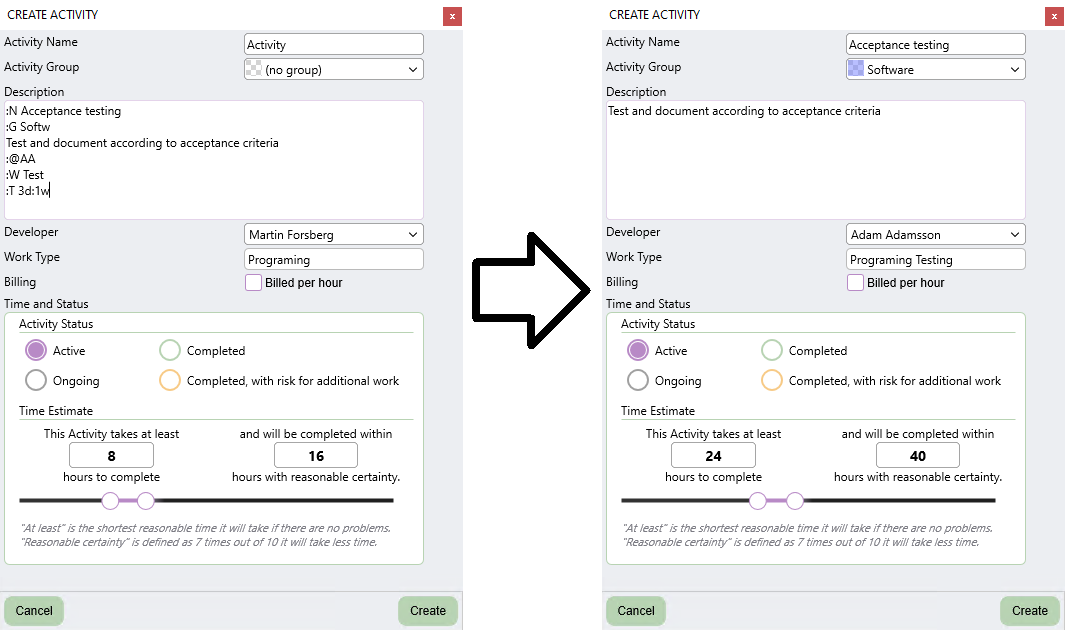
All accepted command lines will be removed from the description when you exit the description field, or press CTRL-D.
As usual a few more minor improvements are included in this release.
Download The PlanMinder by clicking the download button. Then run it. The installer will replace your existing version of The PlanMinder. You will have to close any open instance of The PlanMinder during the installation process.
You will always find the latest version of The PlanMinder on the Download Page, together with more general installation information.
Previous release 2022-06-13
Read release notes for V2R19B125D. The major V2 release release introduced Scenario Mode.