The PlanMinder is a unique project planning tool that helps your team work more efficiently and saves time on project management. Its continuous planning approach keeps schedules up to date at all times, while uncertainty-aware estimates give you the insight to make better decisions. Here are some of the features that make it possible.
In The PlanMinder, your project plan describes what you will do, and in what order. Not when it will be done. The automatic scheduler takes care of that for you.
You divide your project into activities, and connect lines to define that one activity is dependent on the result of another. You can add milestones and risks to your plan, and connect everything to key milestones called prio points, used to set priority across projects. Because this structure is independent of the schedule, it remains stable even as timelines shift, making your plans easier to maintain.
Assign activities to people on the project team. Estimate the amount of work required for each activity, and how uncertain this estimate is.
The prio point milestones in your projects appear in a priority list. The PlanMinder will schedule the activities based on the priority you set, and on how activities depend on each other.
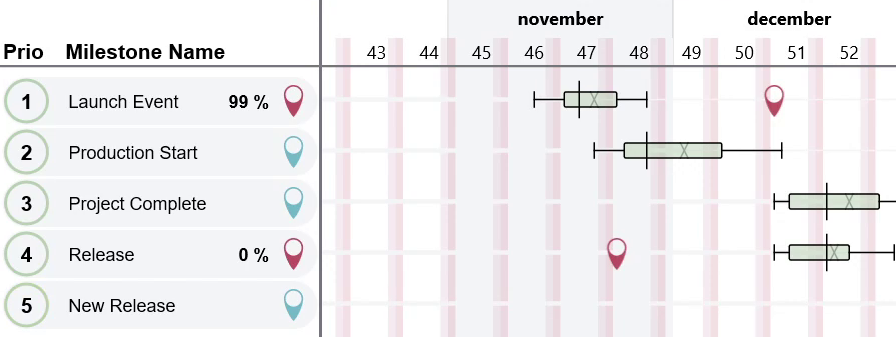
In the priority list you can see when each milestone is likely to be reached, based on the uncertainties in your work estimates. Drag and drop to change priorities, and instantly view how your changes impact the schedule.
You can turn any milestone into a deadline by assigning a date to it. The PlanMinder calculates the probability of meeting that deadline, factoring in uncertainties from across all scheduled projects.
Monitoring this number gives you an early warning if you need to do something about it. Since it is so easy to change plans with The PlanMinder, you can test what changes will work, and at what point you will need to deploy them to be effective.
Being prepared for bad news not only increases the likelihood that you will be able to meet your deadline. It also lets you do it more efficiently than with a last minute effort.
The Chronos view shows the scheduled work on a timeline layout, similar to a Gantt chart. This displays the schedule for the most likely outcome of each activity.
You can inspect and optimize the schedule by reassigning tasks, and immediately see the effect. Identify bottlenecks and potential idle time, and adjust to keep your team productive.
Visualize schedule uncertainty using multiple display options. This is especially valuable for long-term planning and risk assessment.
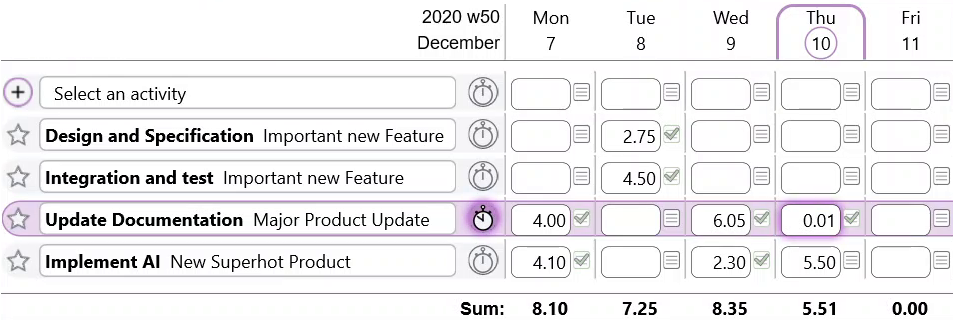
Project team members report the work they do on activities in The PlanMinder. Remaining work is automatically rescheduled, keeping plans and schedules up to date.
Team members can also update the estimate of remaining work as the project advances and new insights emerge.
The work schedule tells the automatic scheduler who is available and how much they can contribute. Set a standard work week and include public holidays to reflect real-world availability.
You can customize each person’s schedule with exceptions, time off, overtime, or reserved days for other responsibilities. Alternatively, let team members manage their own availability directly.
Discrete risks represent something that will become either true or false, but the outcome is uncertain. Examples include passing or failing a test, or needing an extra round of prototyping.
By modeling risks in your plan, you can anticipate their impact on your timeline and budget, and make informed decisions on how to handle them.
Some steps in your project may be dependent on external events beyond your control. External Activities are used in The PlanMinder to model the likes of subcontractor deliverables, supplier shipments or third party reviews.
If you have some work that is not considered done until it has been approved, you can use Checkpoints in your plan. They act like milestones, but the assigned person must confirm before any dependent activities are scheduled.
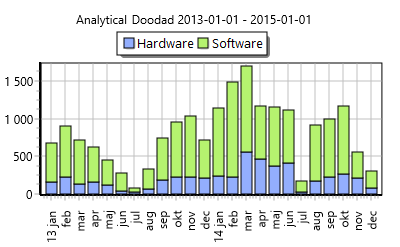
Data exploration tools let you explore both historical data and the planned future. With visualizations and filters, you gain a clear understanding of progress, problems, and uncertainty.
The project report tool helps you write accurate and insightful status reports. And as a reader, The PlanMinder helps you find the important issues by extracting standard sections into an overview.
The PlanMinder has a presentation view designed to display information you need during a project meeting. Show a project plan and status, or the schedule, alongside the latest project report or the current priority list. Explore the team availability overview, and always have the option to dig deeper to answer questions that arise.
No need to gather data and prepare slides.
As you work with The PlanMinder you will build up a database of experience. Use the exploratory tools to see what actually has happened in previous projects. Use it as a reference when estimating new projects. See what has caused problems in the past, and get better at estimating risks.
Human memory is subject to cognitive bias, but with the records in The PlanMinder you can understand what actually happened.
You can enable a billable flag in work reports to track time for invoicing. Track billable hours directly in The PlanMinder without the need for extra tools.
The way plans and schedules are displayed in The PlanMinder makes it possible for all team members to understand the priorities and how delays affect the timeline.
Teams can choose to focus on a problem activity, temporarily disregarding the planned schedule. Your plan won’t break down, as the schedule is just updated with information about what actually has been done, and what remains.
This encourages collaboration and empowers teams to make decisions that serve the organization’s best interests, rather than being constrained by a rigid plan.
Scenario Mode lets you explore how different scenarios will affect your plans, separate from the active plan. Test and optimize, share and discuss, and when a decision is made, activate with a single click. You can keep a plan B ready and up to date in a scenario until the day you need to activate it.
Use the Criticality, Bottleneck and Key Person analyzing tools together with different visualization modes to optimize your plans for time to market, risk or cost. Discover problems and opportunities and make sure your team is creating the overall best value, instead of sub-optimizing just for the most immediate goal.
The PlanMinder Online service offers a touch-friendly web interface for mobile devices. Report work and update estimates from wherever you are.
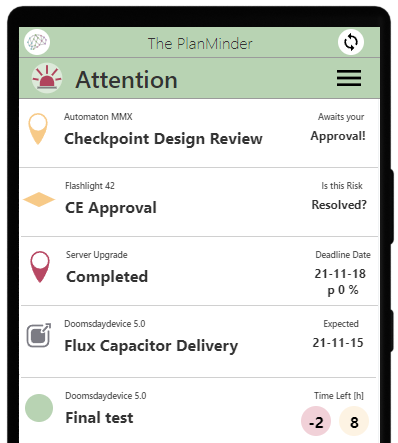
The Attention screen on the home tab, and in the mobile user interface, highlights what needs your immediate attention. It flags overdue updates, high-risk deadlines, and activities that need revised estimates.
A similar page will show you all the latest updates for activities you are responsible for or managing. It lists recently completed activities and updated estimates, including comments.
A calendar shows what activities The PlanMinder has scheduled for you, and what everyone else on the team is doing. It includes a ‘working from home’ flag, to easily share that status.
The way The PlanMinder handles estimates helps counter common inherently human problems; Unwarranted optimism and the desire to look good in the eyes of others. And the fact that most people are really bad at grasping probabilities.
You estimate time using two values: One for a best-case scenario, unlikely but not impossible to reach, and one you are reasonably sure you will be able to beat.
Being reasonably sure, defined as seven times out of ten, is intuitive and a probability people can reason about. All your optimism goes into the first value, and you can dig into your experience and consider all risks for the reasonable sure estimate.
The computed accumulated uncertainty of many smaller guesses is much more accurate than one person's gut instinct for a project as a whole. And with more accurate information, knowing how much or little you do know, you can make better decisions. Especially when you always have information that is up to date.
As The PlanMinder is a self-hosted service, you decide where your data lives. Your project plans may contain your most sensitive business secrets, or those of your clients. You can host the database in-house or with a trusted cloud provider that meets your standards.
Built-in tools let you anonymize or delete data related to specific projects or individuals, making it easy to comply with data protection laws like GDPR and meet confidentiality requirements in contracts.
Don’t worry, it’s easy to set up a database server.
Good planning doesn’t just affect your bottom line and your reputation - it’s a workplace health issue. Stress is the leading work-related risk for office workers. It’s not only driven by heavy workloads, but also by uncertainty and lack of control. Don’t wait. Level up your project planning with The PlanMinder today.